


A spell to cast, an ally to heal, a well-earned reward to collect—there’s plenty to keep you busy in Azeroth. If you prefer a gamepad, World of Warcraft: Forever gives you another way to join the action.
In World of Warcraft: Forever, we’ve refined targeting, casting, looting, and menu navigation for gamepads while keeping the familiar feel players have come to know.
WoW: Forever supports all XInput-compatible controllers and includes Xbox and PlayStation button icons to help you recognize the controls.
Press Escape to open the Game Menu, select Options, then choose Gamepad under Gameplay to switch from keyboard-and-mouse input.
Make the experience your own in the Gamepad settings. You can adjust Camera, HUD Modifier, Frame Focus Style, Action Bars, Targeting, and Raid Targeting Options.
Just as you arrange spells and abilities on your action bars, take a little time to set up your gamepad controls around the abilities you use. Try a layout that feels comfortable, then adjust it as you learn new spells or change how you play.
A little faction pride, right in your hands!
On controllers with supported lighting, the light turns red for a Horde character and blue for an Alliance character.
Take a little time to try moving, selecting targets, and using your abilities before heading into a busy fight.
Here’s a quick guide to moving, choosing targets, using abilities, and navigating menus with a gamepad. We’re using Xbox button names to describe these controls.
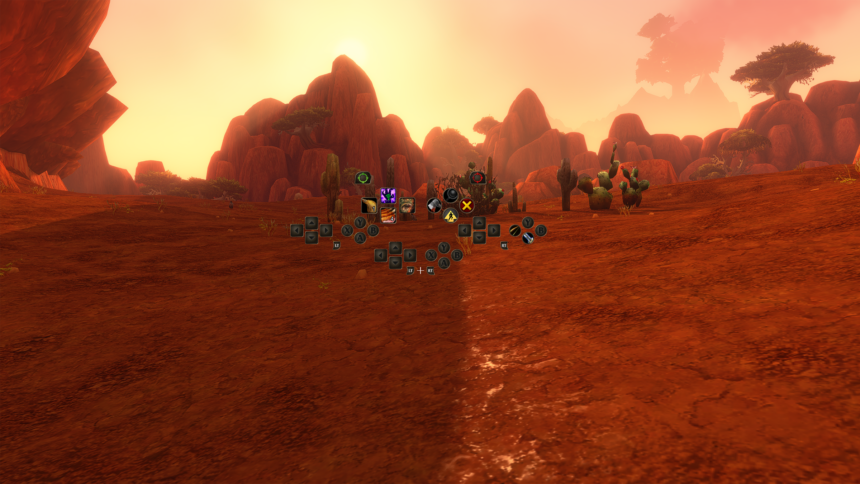
The heads-up display, or HUD, uses several panels arranged to mirror a gamepad’s layout, helping you connect your abilities with the controls in your hands.
The gamepad HUD shows four action bars. Each uses the same button layout but can hold a different set of spells and abilities. Hold LT, RT, or LT + RT to switch bars, and release the triggers to return to the default bar. The HUD updates to show the abilities available on your active bar.
For example, a Mage could assign four spells to the same directional button:
These are example assignments, not fixed bindings—choose the spells and abilities that suit you.
Want separate layouts for combat, utility abilities, or frequently used actions? You can switch between three action bar sets by holding LB + RB and pressing Left or Right on the directional pad (D-pad).
Each set contains four action bars with 28 slots combined, giving you 84 customizable spell and ability slots across all three sets. The button layout stays consistent as you switch sets, so you can reach different groups of abilities without opening menus.
Hold both shoulder buttons (LB + RB), then press the following buttons to access frequently used HUD elements:
You can also access these features through the main radial menu. The shortcuts let you reach them directly with your gamepad; typing in chat still requires a keyboard.
A gamepad legend sits in the upper-left corner of the main screen. It expands when you take certain actions to show additional options.
Most screens also include gamepad footers that show the interaction options for each panel. Not every screen has a footer yet: gamepad support remains in a functional beta, and interface updates are ongoing.
Tanking, healing, and dealing damage all call for selecting the right target at the right moment. Friendly and hostile targeting controls help you choose allies and enemies as you play with your party.
The gamepad HUD uses a layout built around the controls in your hands. Beyond combat, interface updates are ongoing to make bags and menus easier to navigate with a gamepad.
Controller support is available in WoW: Forever in a beta state for players who prefer a gamepad. Further refinements are planned as work on the experience continues.
Reducing the need for keyboard input remains a development goal, with a keyboard-free experience as the longer-term aim. For now, keep a keyboard within reach for tasks such as typing in-game chat.
Ready your gamepad and gather your party. Try the controls, adjust the settings to suit you, and enjoy a little time in Azeroth together.
Explore WoW: Forever with a Gamepad — World of Warcraft – Blizzard News



Leave a Comment